
A consumer number is a unique billing identifier linked to a gas connection and its customer record. Think of it as the number that helps the gas company match your home or business with the correct monthly bill. It is not the same thing as the amount due, meter reading, billing month, or meter serial number.
This guide is for people who have a printed bill, an older bill, or a digital copy but are unsure which number they need for an online lookup. It also helps when several numbers appear close together and the labels are easy to confuse. The safest habit is simple: read the field name first, then copy the number exactly as it appears.
Why Your Gas Consumer Number Matters in Lahore, Pakistan
For an SNGPL customer, the consumer number matters because the official Consumer Bill form asks for that identifier before it can retrieve the bill. The same page also uses a CAPTCHA, so both pieces of information must be entered before submission.
In real use, this number saves you from searching through meter readings, dates, charges, and other bill fields that do not identify the billing account. It becomes especially useful when the paper bill has not arrived, you need another copy, or you want to confirm the current bill before payment.
Keep one clear photo or PDF of a recent bill in a safe folder on your phone. That small step makes the consumer number easy to recover without typing from a faded paper bill each month.
Where to Find the Consumer Number on Your SNGPL Gas Bill
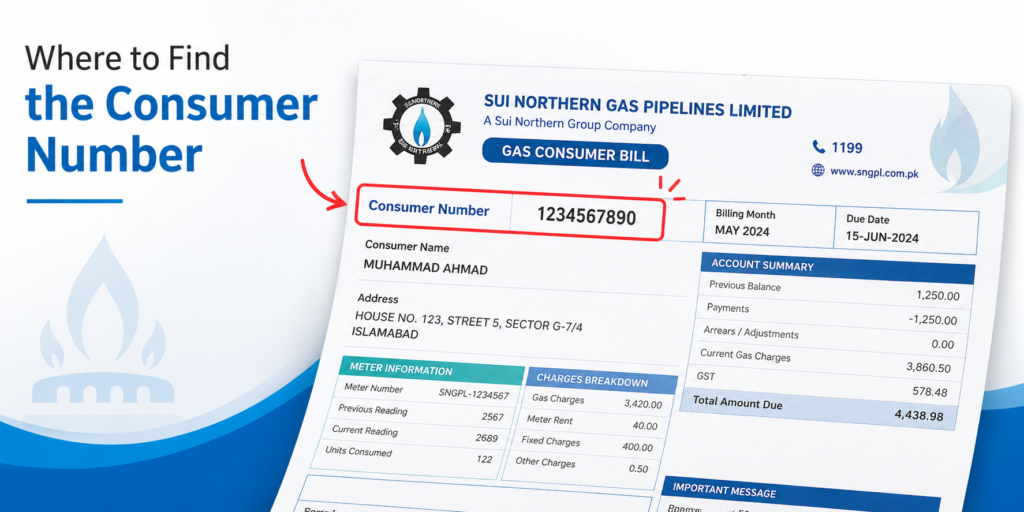
Start with the customer or account information area of the bill. Look for the label “Consumer Number” and copy the digits shown beside it. Do not rely on advice that says the number is always in one fixed corner. Bill layouts can change, and screenshots on older websites may show a different design.
The official SNGPL Consumer Bill page currently labels the required field “Consumer Number.” It does not state a universal digit length on that form. That matters because many third-party pages give different lengths. A safer approach is to use the complete number printed against the correct label instead of adding, dropping, or guessing digits.
A useful check is to compare the number on two recent bills from the same connection. The billing month, meter readings, charges, and due date will change, while the account identifier should remain tied to that customer record unless the account itself changes.
When reading a scanned bill, zoom in before copying the digits. Numbers such as 0, 6, 8, and 9 can become hard to tell apart on a low-quality image.
A common real-world mistake happens when someone reads the bill from a phone photo taken at an angle. The customer details can be sharp while the small account digits look blurred. Before entering anything, rotate the image, zoom to the label, and compare each digit with the original paper if it is available.
Another useful clue is consistency across monthly copies. A due date and payable amount change each cycle. Meter readings also move as gas is used. The account identifier serves a different purpose, so comparing two bills can help you separate stable account details from changing billing data.
SNGPL Consumer Number vs SSGC Customer Number: What Changes?
The main change is provider terminology. SNGPL calls the field “Consumer Number” on its current Consumer Bill form. SSGC calls its online lookup field “Customer Number” and currently tells users to enter a 10-digit Customer Number to pay or download a gas bill.
That difference is easy to miss because people often use “consumer number,” “customer number,” and “consumer ID” as general search terms. The official form is more important than the wording used on a blog or social post. Follow the label used by your gas company.
Do not assume the number format for one provider also applies to the other. SSGC gives a clear 10-digit requirement on its current portal. SNGPL’s current Consumer Bill form asks for a Consumer Number but does not display a fixed length. Copy what appears on your SNGPL bill rather than forcing it into a number length found on another website.
Consumer Number vs Meter Number: How to Tell Them Apart
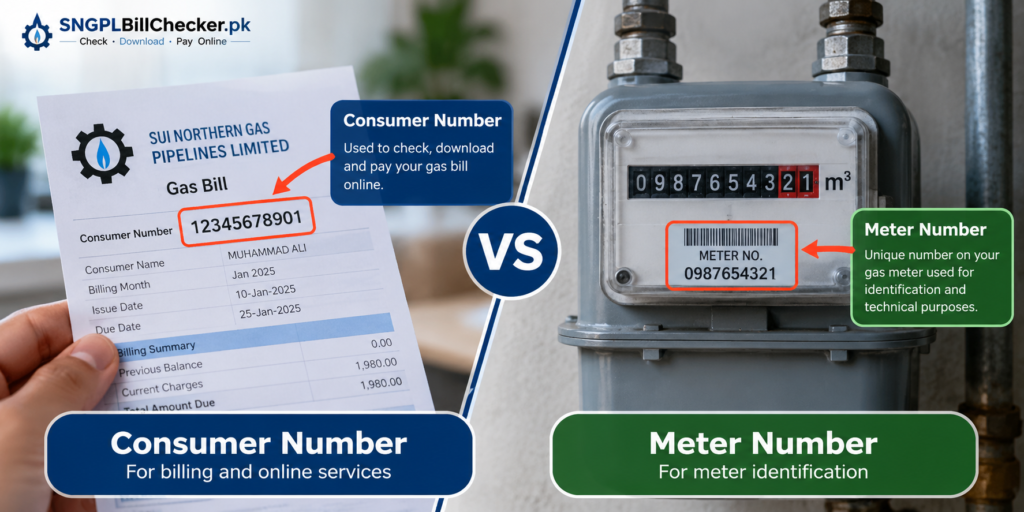
These two numbers serve different jobs. Check the label before you type anything into a bill portal.
- Consumer number: Identifies the billing account or gas connection record. SNGPL asks for this on its Consumer Bill form.
- Customer number: SSGC’s current online bill portal uses this term and asks for 10 digits.
- Meter number: Identifies the physical meter installed at the property. SSGC’s own complaint form lists Customer Number and Meter Number as separate fields.
- Meter reading: Shows the recorded meter value for a billing period. It is not an account ID.
- Quick check: If a number appears next to “Meter Number” or a similar meter label, do not treat it as the consumer number just because both are numeric.
This distinction matters when an online lookup returns no result. One of the first things worth checking is whether the meter number was copied by mistake.
Is Consumer Number the Same as Account ID or Reference Number?
Not always. “Account ID,” “reference number,” “consumer ID,” and “customer number” can sound interchangeable, but utility systems may use them differently. The safest rule is to match the label requested by the official portal with the label shown on your bill.
For SNGPL bill retrieval, the current official form asks for Consumer Number. That is the field you should use there. Do not replace it with a meter number or another reference simply because that number is easier to spot.
On older screenshots, payment receipts, banking apps, or third-party bill sites, you may see different wording. Treat those labels as context-specific. A payment reference may help process a transaction, while a meter serial identifies equipment. Neither should automatically be treated as the gas account identifier.
When unsure, open the latest bill and compare the exact field names. This is more reliable than searching for a certain number of digits.
This same rule helps when someone sends you a cropped image and asks which number to use. Ask for the part of the bill that includes the field label, not just a row of digits. Without the label, a meter number can easily be mistaken for an account number.
How to Use Your Consumer Number to Check an SNGPL Bill Online
Once you have the correct number, an online lookup is straightforward. The current SNGPL bill form asks for the Consumer Number and the CAPTCHA shown on screen, then provides a submit option.
Type the digits carefully instead of copying nearby spaces or punctuation from a PDF. If you are working from a photo, zoom in and read the number twice before submitting. A single wrong digit can point to no record or stop the lookup.
You can also use the sngpl bill check page as a convenient starting point when you want to reach the bill-checking process without searching through several unrelated results.
After the bill loads, verify simple details before relying on it. Check the customer name or service address where shown, billing month, due date, and payable amount. This prevents a wrong account entry from going unnoticed.
Avoid saving your consumer number in a public note, shared screenshot, or social media post. It is account information and should be handled with reasonable care.
How to View or Download a Duplicate Gas Bill
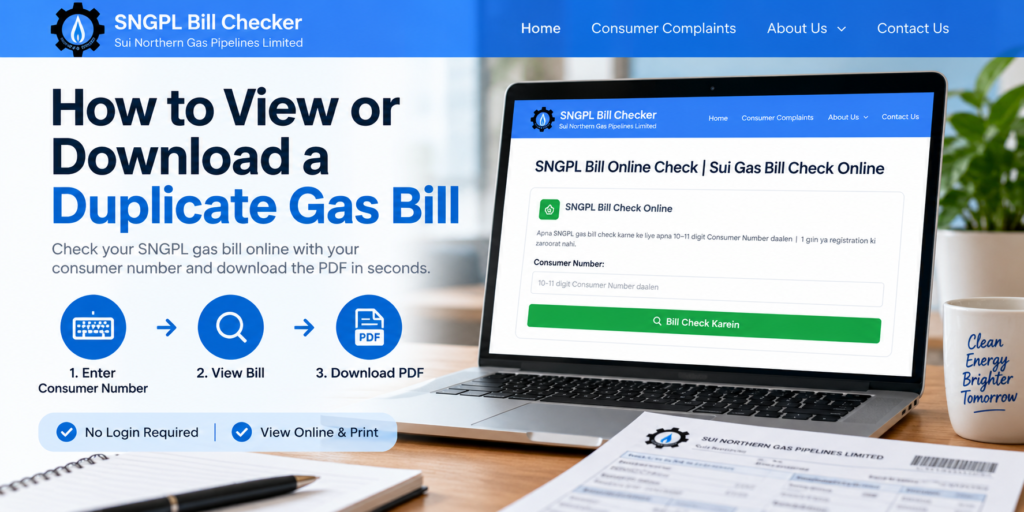
A duplicate bill is simply another copy of the billing record for the same account and billing period. It is useful when the printed bill is lost, damaged, late, or unavailable when you need to pay.
For SNGPL, begin with the correct Consumer Number. Enter it on the bill form with the required CAPTCHA. Once the bill is displayed, use the available browser or page options to save or print the copy if needed. The official SNGPL site places “Get Your Gas Bill” under Customer Services and provides the Consumer Bill form for retrieval.
For SSGC, the current official portal is more explicit: it asks for a 10-digit Customer Number to pay or download the gas bill.
Save the file with a clear name such as the billing month and year. That makes it easier to find later and reduces the chance of opening an older bill by mistake.
When saving a replacement bill, keep the full page rather than only the payment portion. The full copy gives you context around the customer details, meter information, dates, and charges. That context is useful the next time you need to identify a number quickly.
What to Do If You Cannot Find or Have Lost Your Consumer Number
Losing the paper bill does not mean the account information has disappeared. Start with places where an older copy may already exist. Check downloaded PDFs, email attachments, phone files, family records, or a previous printed bill from the same connection.
The account number is easier to recover from a full bill than from a payment screenshot because payment confirmations may show only selected details. When you find an old bill, look for the provider’s account label rather than the meter number.
If no copy is available, use the official customer-service route for your provider. Be ready to give information that helps staff identify the correct connection. Do not post a CNIC, account details, full address, or bill image publicly while asking strangers to find the number.
For future use, keep one recent bill in a private digital folder. A clear PDF is better than a cropped screenshot because it preserves the labels around each number.
If the connection belongs to a landlord, parent, office, or shared household, avoid guessing from a different property’s bill. Match the service address or customer details on the bill before using its account identifier. Similar file names can cause the wrong bill to be opened, especially when several utility PDFs sit in the same folder.
Why Your Consumer Number May Not Work During an Online Bill Check
A failed lookup does not always mean the account is invalid. Small input errors cause many avoidable problems. Work through the basics before assuming there is a billing issue.
- Recheck every digit against the bill and remove accidental spaces before or after the number.
- Make sure you entered the Consumer Number, not the meter number, reading, payment reference, or another numeric field.
- Confirm that you are using the correct provider’s bill system.
- For SSGC, check that you are entering the 10-digit Customer Number requested by its current portal.
- For SNGPL, copy the Consumer Number exactly as shown rather than changing it to match an unsupported digit-length claim.
- Enter the CAPTCHA again if it was mistyped, expired, or refreshed on the SNGPL page.
- If the details still fail, use the provider’s official customer-service or complaint channel instead of repeatedly guessing numbers.
A screenshot of the error can help when you contact support, but cover personal information before sharing it anywhere outside an official channel.
Check Your Gas Bill Easily With SNGPL Bill Checker
Once you know which number to use, checking a bill becomes much simpler. The most important step is not memorising a digit count. It is matching the label on your bill with the field requested by the correct provider.
Keep a recent bill copy, confirm the account number before submitting it, and check the billing month and customer details after the record opens. These small checks reduce common mistakes such as entering a meter serial or opening an old bill.
SNGPL Bill Checker helps you move from finding the right account number to checking your bill with less confusion. Use the online gas bill check option when you are ready to retrieve your bill, then verify the details before payment.
FAQs
Where can I find my SNGPL bill consumer number?
Look for the field labelled “Consumer Number” in the customer or account-information area of your SNGPL bill. The official SNGPL Consumer Bill form uses the same label. Copy the complete number exactly as printed rather than relying on a guessed digit length.
Where can I find my SSGC consumer number on my bill?
For online bill retrieval, SSGC currently asks for a 10-digit “Customer Number.” Look for that customer identifier on your SSGC bill and use the exact digits shown.
How do I find my consumer ID number?
Check a recent printed bill or PDF and look in the customer or account details for the provider’s account identifier. On SNGPL, use the Consumer Number. On SSGC’s current bill portal, use the Customer Number.